

The whole crew knows what’s next.
Build the tour once, on the web. Everyone on it carries their own day sheet on the phone: times, travel and hotel, with or without signal.
Free for a crew of up to six. No card needed.
In 2 h 7 min
Soundcheck
16:00 · Auditorio Nacional
- Mon 28MonterreyShowMX
- Tue 29To Mexico CityTravelMX
- Wed 30Mexico CityShowMX
- Thu 1Mexico CityDay offMX
- Fri 2To Los AngelesTravelUS
- Sat 3Los AngelesLoad-inUS
- Sun 4Los AngelesShowUS
- Mon 5San DiegoShowUS
- Tue 6San DiegoDay offUS
- Wed 7To ChicagoTravelUS
- Thu 8ChicagoRehearsalUS
- Fri 9ChicagoShowUS
- Sat 10To LondonTravelUK
- Sun 11LondonShowUK
Northbound Tour 2026 · 6 shows · 4 travel days · 2 days off
Crewik works out each day’s kind for you, days off included, and shows where the crew is.
The day, line by line.
Crewik is built around the day sheet. Here is one show day, and what Crewik does on each line of it.
Day sheet · Northbound Tour 2026
Wednesday 30 September
Mexico City · Auditorio Nacional
Times are local to this place
07:30
Lobby call
Everyone taps “I’m here”.
Any line can ask people to check in: a lobby call, a bus call. Each person taps “I’m here” in the app and everyone sees the count. Administrators also see who is still missing.
09:10
Travel
Flights, buses and rooms, per person.
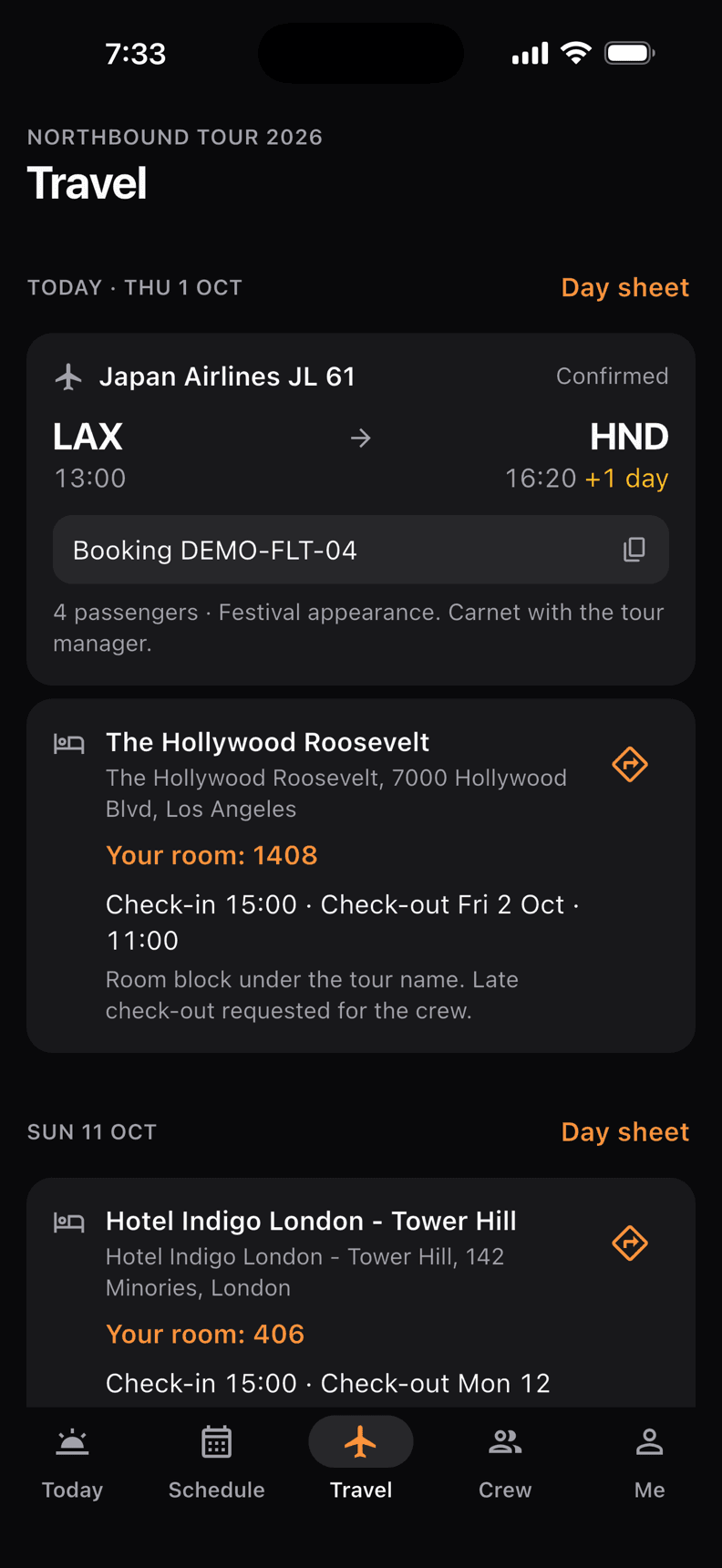
Planes, buses, vans, boats and trains, with booking references to copy. Look a flight up by its number to fill in the airline and airports. Each person’s day sheet shows their own hotel and room.
13:30
Stage
A late change doesn’t slip by.
Move a block of times in one go and the people on that date get a notification. On the phone, schedule lines that changed since you last looked are marked: new, removed, or what they were before.
14:30
Production office
Per diem out, receipts in.
Make the per diem for the whole crew in one sheet for a run of days, then each person signs on the screen as they collect it. The sheet prints as a PDF or opens as a spreadsheet. On the road, anyone can photograph a receipt in the app and send the expense; the crew’s admins approve it and mark it paid back.
- Now 15:53
16:00
Audio
Reminders that ring in a basement.
Whoever builds the schedule puts a reminder on the lines that matter. Each phone sets them itself, so they arrive with no signal. Next up also sits on the Home Screen and Lock Screen (iOS 17 or later) and on the Apple Watch.
19:00
Doors
Hand the venue a day sheet.
Anyone on the crew can send a day as a PDF, in one of six looks: four for print, two made for a phone, with the tour’s logo and colour. Administrators can also send a link for people without the app, such as the venue or the promoter. The link shows the day’s times and places, without travel or hotels, and stops working after two weeks.
20:00
Tomorrow
Tomorrow arrives the evening before.
Every evening, around eight by their own phone’s clock, each person gets a notification with what tomorrow is, in English or Spanish.
21:00
Show
Cues and set lists for the show itself.
Timed calls during the show, by department. Songs with key, tempo, lyrics and charts for each part, in a running order you can print. The charts are for the musicians only.
23:30
Load out
Every case back on the truck.
A tour carries its list of cases. At each show the crew calls Load-In and Load-Out, case by case, with the phone’s camera or a barcode scanner, and picks the truck each case goes on. Whatever is missing is named, and the admins get a notification when the load-out is done. A date on no tour checks gear out and back in instead.
Phone for the floor.
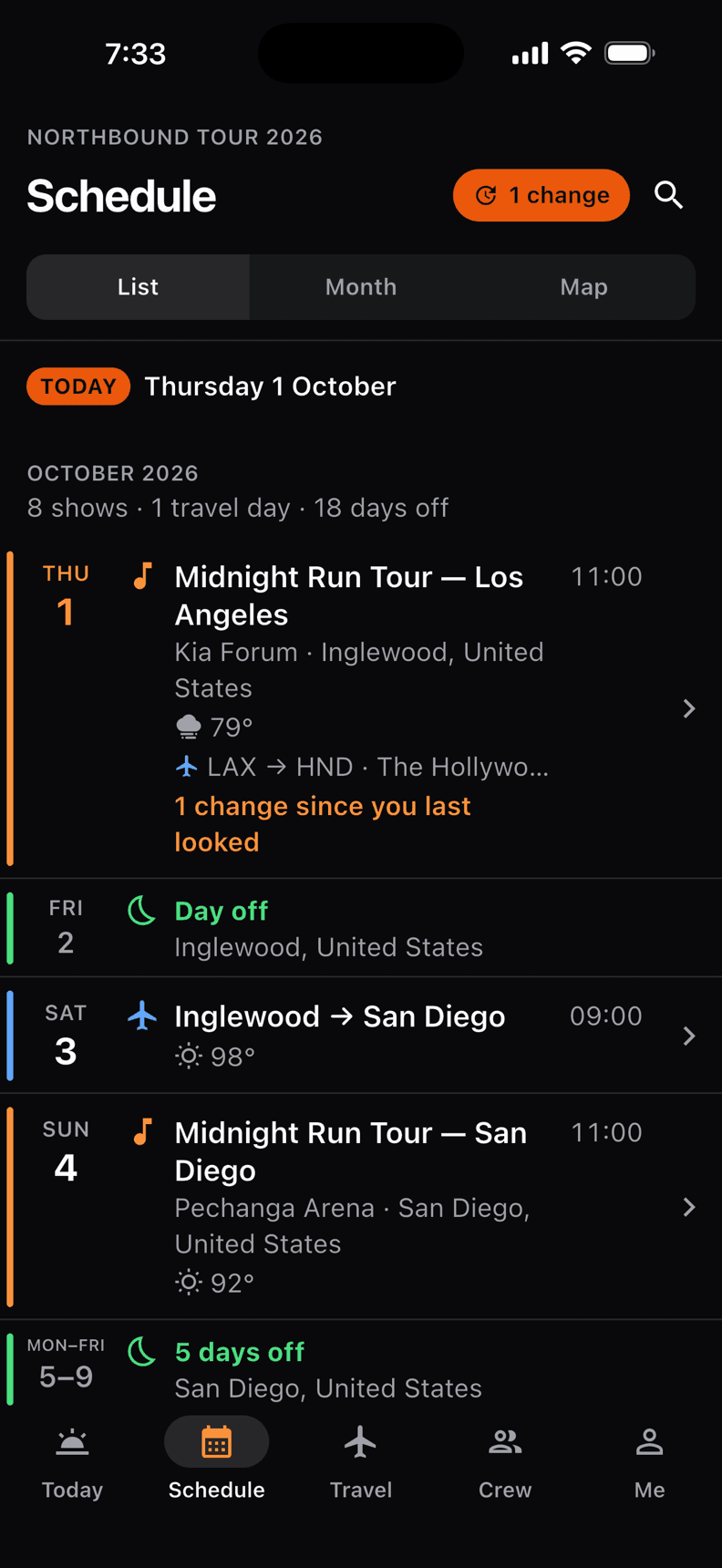
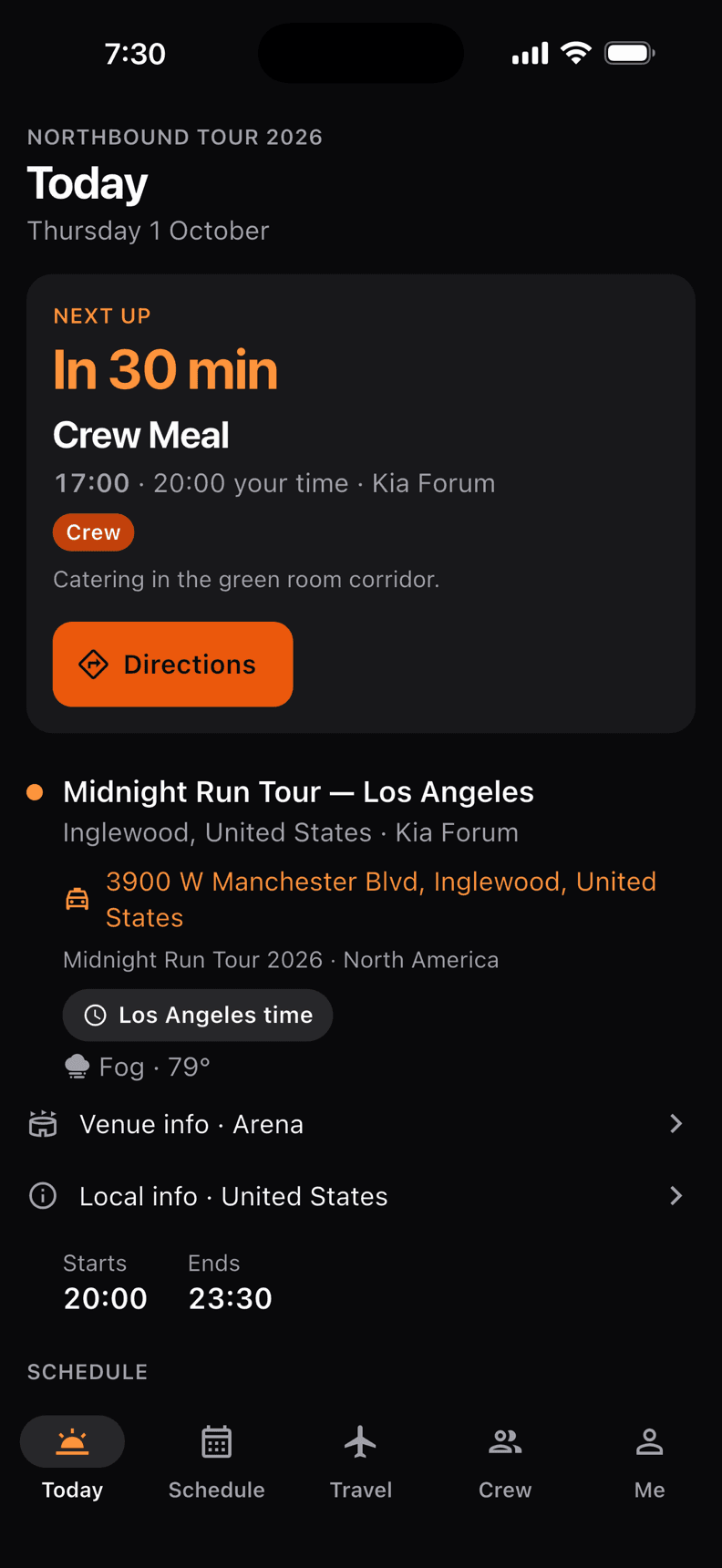
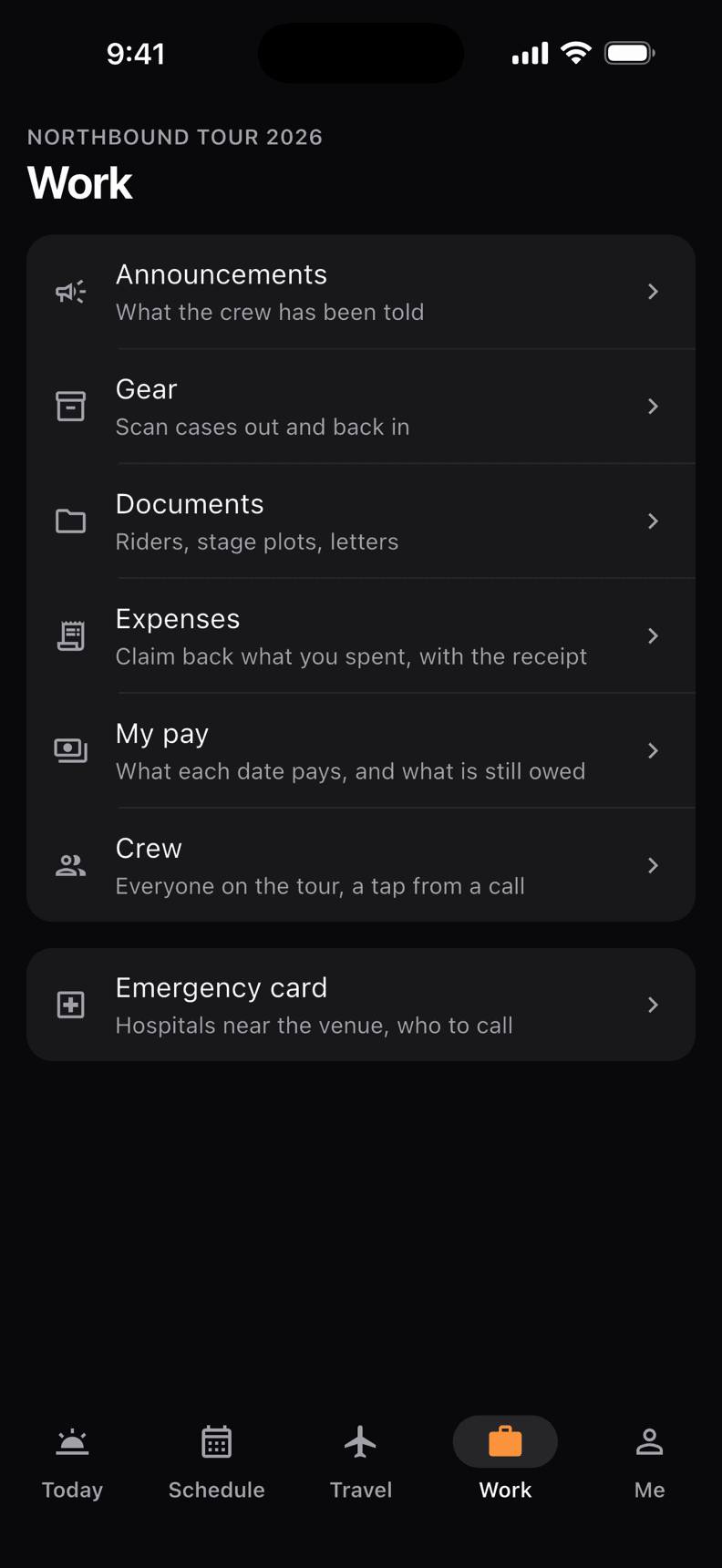
The app answers one question: what’s next for me? Five tabs, words instead of mystery icons, and text you can read at arm’s length.
- 01
Today
What’s next for you, counting down, and the rest of the day one scroll away.
- 02
Schedule
The tour as a list, a month or a map. Days off show where the crew is.
- 03
Travel
Flights, buses, trains and hotels in order, with your room.
- 04
Work
Announcements, gear, documents, your expenses and pay, the crew list and the emergency card.
- 05
Me
Your profile and your crews, your calendar, language, dark or light, reminders and the widget.
Show the driver
The venue or hotel name and address in big type, to hold up in a taxi.
Weather at every stop
The forecast for each stop on the tour, up to 16 days ahead.
Local info
Emergency number, dialling code, money and plugs for over 100 countries.
Emergency card
The hospitals nearest each venue and the crew’s emergency contacts. Your own medical details stay on your phone.
Showtime on the Lock Screen
A countdown to showtime on the Lock Screen and in the Dynamic Island, or in a notification on Android.
Siri and shortcuts
Ask what’s next, when the show starts or which room you are in. Add an expense or scan gear in one step.
Your calendar
Your days in Apple, Google or Outlook calendar, kept up to date on their own.
Easy to read
Normal, large or extra large text. Dark for backstage, light for daytime.
English and Spanish
The app, the watch, the widget, the notifications and app.crewik.com.
No signal. Still on time.
Venues are concrete boxes. Crewik assumes the connection will drop, so the day sheet never depends on it.
90days back
Your upcoming days and the last 90 are kept on the phone, encrypted. In a basement, a stadium or on a plane, they open straight away.
0bars needed
Reminders are set on the phone itself, and the tour map is drawn by the app, so neither waits for a connection.
2changes waiting
Check in or move a time with no signal and it waits in line, then sends itself. Whatever changed elsewhere comes in when you are back.
Desktop for the office.
Tour managers and production managers build everything on the web, at app.crewik.com. What each person needs from it lands on their phone.
- 01
Tours, legs and the map
A tour holds its legs, a leg holds its dates. On the map every date with an address is a pin and flights are drawn as lines, for everyone’s travel or just your own.
- 02
Run of show
The schedule, the show cues and the tasks for a date sit on one page. Every line has a department: audio, lighting, video, stage, wardrobe and more. Select the lines you want and shift them all in one go.
- 03
One schedule, a day sheet each
Aim a line at the band, the crew or production. Each person’s day sheet shows only their lines, their travel and their room.
- 04
People, travel and rooms
Put people on each date, add their flights and buses, and keep the rooming list with room types, room numbers and confirmation numbers.
- 05
Documents
Riders, stage plots, contracts, permits and customs papers, filed against the date. On the phone they open with no signal once downloaded.
- 06
Your day sheet, your way
Edit the day sheet on the web the way you would a document: type or paste lines from a spreadsheet, hide what the crew does not need, reword anything, add notes and sections, or start from the last day like it. The app, the shared link and every PDF follow.
- 07
Gear by the case
Cases, racks and trunks with their codes, and loose items by the count. Give a tour its gear list and each show has a Load-In and a Load-Out to call. Print the manifest with a box to tick beside each case.
- 08
Works with Master Tour
The crew’s owner connects Master Tour, and the tours you pick stay in step every hour, hotels and travel included. Anything edited in Crewik is held for you to choose, never overwritten.
- 09
Money
Income and expenses for each date, in five currencies. Pay for each person, per diem sheets signed for on collection, and the crew’s expenses from the app, approved and paid back. The Crew page shows what is owed to everyone. Only administrators see it.
- 10
Announcements and messages
Send a note to the crew and everyone gets a notification; you see how many have seen it. Or write an email that fills in each person’s own name, hotel and room. A date can have its own chat too.
- 11
Venues
Keep each place you play once: its address, capacity, who to call and what you learned last time. The crew sees the venue’s details on the day.
- 12
A board backstage
Put a date’s schedule on any screen backstage with one link and no sign-in. It updates itself as times move.
- 13
Roles that fit a tour
Administrators run everything, and only they see the money. The charts are for the musicians. Everyone else’s lists show the dates they are on, and in the app a guest sees names without phone numbers or emails.
- 14
Only what you use
No set lists on this tour? No gear to track? The crew’s owner switches any part off and it disappears from the menus.
Priced for the crew, not per head.
One price covers everyone on the crew, and the phone app comes with it. Every plan has every part of Crewik; they differ only in how much you can keep.
All access
Solo
$0free, for good
For a small crew getting started.
- 20 upcoming events
- 6 crew members
- 10 files
- Everything else without limits
All access
Crew
$8a month, for the whole crew
For a working band or a busy production.
- 50 upcoming events
- 20 crew members
- 50 files
- Everything else without limits
- Priority support
All access
Production
$32a month, for the whole crew
For long tours and large crews.
- Unlimited upcoming events
- Unlimited crew members
- 100 files
- Everything else without limits
- Premium support
Put your next tour in.
Make a crew, add your dates and invite your people. A crew of up to six is free.